Does a Factory Reset Delete Your eSIM? What You Should Know Before Erasing Your Phone
You are about to sell your phone, send it for repair or simply start fresh with a factory reset.
Photos, apps and accounts will be erased. That part is obvious.
But what happens to the eSIM?
For users who no longer have a physical SIM card, this is an important question. Removing an eSIM by accident may leave the phone without cellular service until the mobile plan is activated again.
The answer depends on the phone and on the option you choose during the reset.
An eSIM is not just another file stored on your phone
An eSIM is a digital SIM profile that allows your smartphone to connect to a mobile operator without inserting a physical SIM card.
The phone also has an EID, which identifies its embedded SIM hardware.
These are different things.
The EID belongs to the eSIM hardware inside the device, while the operator installs a cellular profile that allows the phone to use a particular mobile plan.
Deleting that profile does not remove the phone's EID.
It removes the cellular subscription information stored on the device.
What happens on an iPhone?
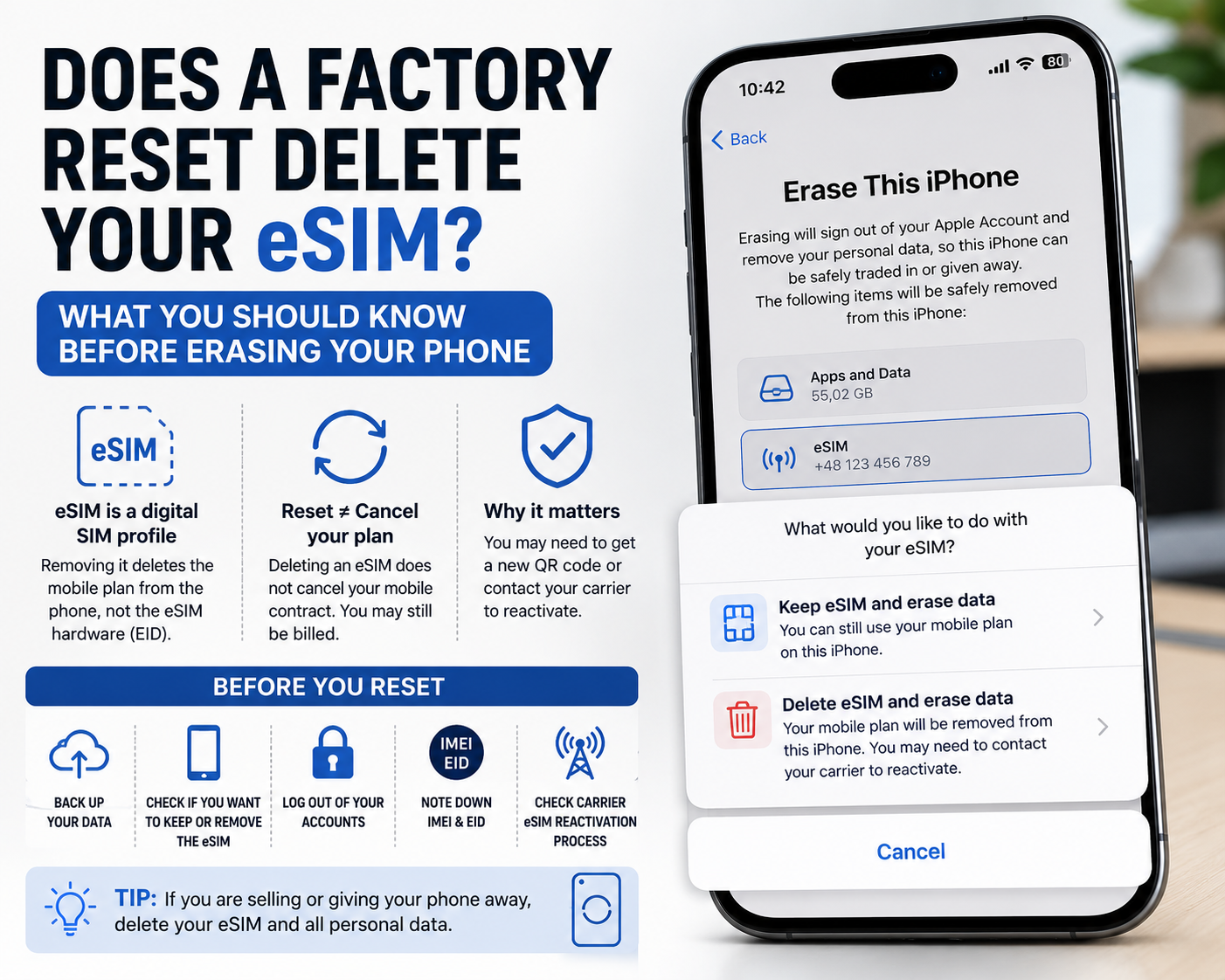
Apple gives users a choice when they erase an iPhone.
When using:
Settings - General - Transfer or Reset iPhone - Erase All Content and Settings
the phone can ask whether you want to:
* keep the eSIM and erase the data
* delete the eSIM and erase the data
This distinction is extremely important.
If you are resetting your own iPhone because of a software problem and plan to continue using it, keeping the eSIM may save you from having to reactivate the mobile plan.
If you are selling or giving the phone to another person, the eSIM should normally be removed together with your personal data.
Apple also warns that if you erase an eSIM, you may need to contact your carrier to reactivate your cellular plan.
Deleting an eSIM does not necessarily cancel your mobile contract
This is another common misunderstanding.
Removing an eSIM from the phone and cancelling your cellular service are two different things.
Deleting the profile from the device does not automatically terminate your contract with the operator.
You may still be billed for the mobile plan.
If you want to cancel the service completely, you normally need to contact your carrier separately.
This matters especially when you are selling a phone and moving your number to another device.
What about Android phones?
Android is less uniform because different manufacturers can use different reset procedures and menus.
Google states that a factory reset removes the data stored on an Android device, but the exact reset options can depend on the manufacturer.
On Pixel phones, eSIM profiles can also be removed separately through the mobile network settings.
This means you should not assume that every Android phone handles an eSIM exactly like an iPhone.
Before resetting a Samsung, Pixel, Xiaomi or another Android phone, check the erase screen carefully.
Look for options referring to:
* eSIM
* downloaded SIMs
* mobile plans
* cellular plans
If the phone gives you a separate option to erase those profiles, make sure you choose the correct setting for what you are trying to do.
Factory reset for troubleshooting? Do not erase the eSIM unless necessary
If you are resetting the phone because of crashes, battery problems or another software issue, removing the eSIM usually adds an unnecessary complication.
Apple specifically advises users not to erase an eSIM as part of troubleshooting unless their carrier tells them to do so.
Why?
Because reinstalling the profile may require:
* a new QR code
* activation through the carrier app
* verification by SMS or another device
* contacting customer support
* a new activation request from the operator
If the mobile plan itself is not causing the problem, there is usually little reason to remove it.
Selling the phone is different
When the phone is going to another person, the situation changes.
You should remove your personal information, accounts and mobile plan from the device.
Before selling or giving away a phone with eSIM:
* transfer your number to the new phone
* make sure the new device has cellular service
* back up your old phone
* remove your accounts
* erase the eSIM profile
* perform the factory reset
* confirm that the phone starts on the setup screen
Do not hand over the phone while your cellular profile is still active on it.
What if you erase the eSIM by accident?
Do not panic.
Your phone number usually does not disappear just because the eSIM profile was removed from one device.
However, you may need to download or activate the profile again.
The exact procedure depends on the carrier.
Some operators allow immediate activation through an app. Others provide a QR code, require identity verification or ask you to contact customer support.
This is one reason why it is worth checking your carrier's eSIM activation procedure before performing a reset.
Why IMEI, IMEI2 and EID can become important
When dealing with eSIM activation, several device identifiers may appear.
Depending on the phone and carrier, you may encounter:
* IMEI
* IMEI2
* EID
On dual SIM phones, IMEI1 and IMEI2 can correspond to different cellular configurations or SIM slots.
The EID is specifically associated with the embedded SIM hardware.
If you are troubleshooting activation or checking a second-hand phone, it is useful to know exactly which device and variant you have.
A device lookup through IMEI24 can help identify available information such as the exact model, manufacturer, Product Name, SKU, storage or device variant.
It should not be confused with an eSIM activation service, but accurate device identification can make conversations with your carrier much easier.
Do not confuse IMEI with EID
They may appear next to each other in the phone settings, but they serve different purposes.
IMEI identifies cellular equipment on mobile networks.
EID identifies the embedded SIM component used for eSIM provisioning.
A phone can also have more than one IMEI.
This is normal on many dual SIM devices.
If your operator asks for a specific identifier during eSIM activation, make sure you provide exactly the one requested.
Before resetting your phone, take one minute to prepare
A factory reset is simple.
Recovering an accidentally deleted eSIM can be less simple.
Before you press the final erase button:
* confirm that your data is backed up
* check whether you want to keep or remove the eSIM
* make sure you know your account passwords
* record your IMEI and EID if you may need them later
* check how your carrier handles eSIM reactivation
That small amount of preparation can prevent a reset from turning into an afternoon spent contacting your mobile operator.
The key difference is why you are resetting the phone
If you are keeping the device, preserving the eSIM may be the better option when the phone allows it.
If you are selling or giving the phone away, remove the eSIM along with your personal data.
And if you are resetting the phone only to troubleshoot a problem, do not erase the eSIM unless there is a specific reason to do so.
A factory reset and an eSIM deletion are related actions, but they are not always the same thing.